
Like most online CRM systems, there will be a dashboard after a user logs into the system. And that dashboard is your CRM system homepage. But, good news is you can customise the crm dashboard according to your needs. A feature that is uncommon among other online CRM systems.
In iCRM, only small amount of information will appear on the dashboard as default and you may continue to add accordingly. This is definitely a plus point on increasing employee work efficiency.
Below are some of the items which you or your employees can include into your dashboard:
- Case
- Event Calendar
- Customer Birthday
- Event List
- Invoice
- Sales Order
- Task Reminder
- Recurrence
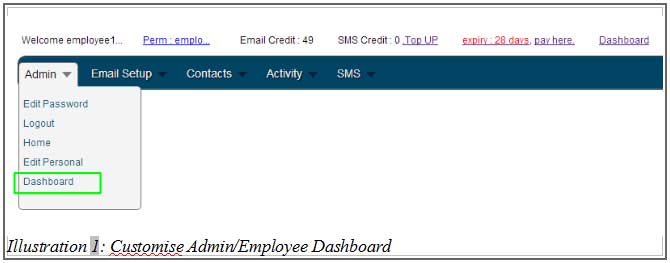
1. To add items to your crm dashboard, go to Admin > Dashboard.
Please click on image to view clearer.
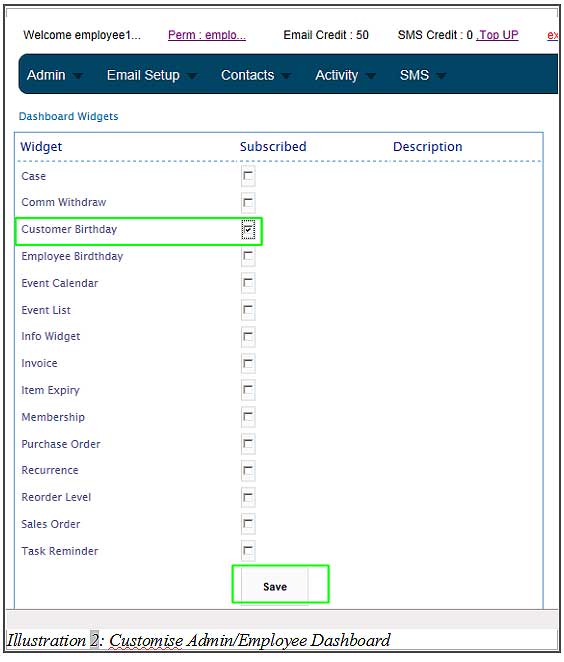
2. “Check” the boxes beside the items which you need it to appear at your dashboard. Then, click “Save” to save your selections.
Please click on image to view clearer.
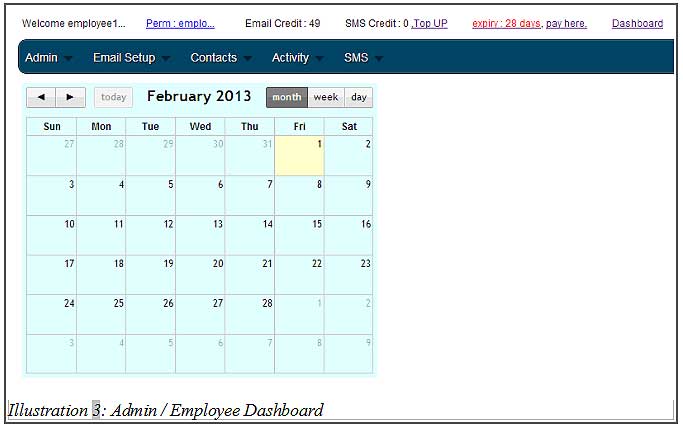
3. Return to your dashboard by going to Admin > Home to see the effect.
Please click on image to view clearer.