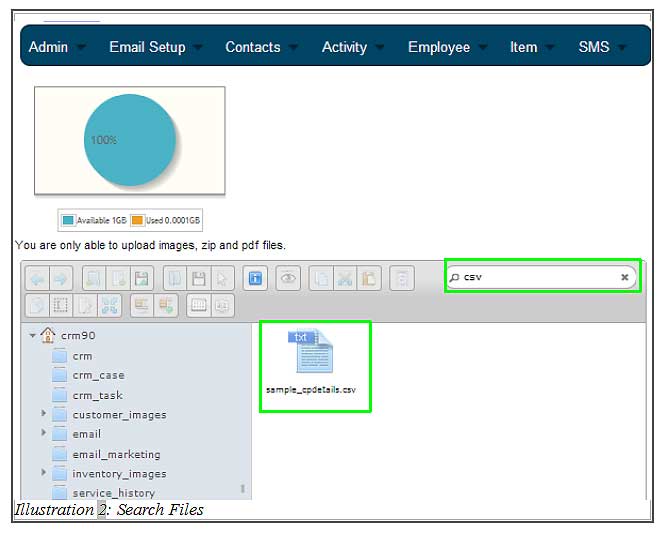

In CRM Malaysia, we allow you or your employees to upload files into the allocated space in the CRM system. After some time, there would be more files uploaded and soon everyone might not be able to keep track what files in the server. Therefore, we have integrated a search function to allow quick search on your files.
You can search your files by typing the file name or or the format of the file and your files will be listed accordingly.
The tutorial below will show you how to search your file easily.
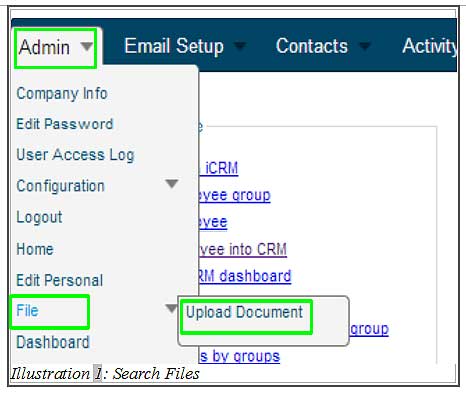
1. Click on “Admin” on your top left corner of your browser, just below the navigation bar menu. Go to File > File Upload.
Please click on image to view clearer.
2. After clicking on “Upload Document”, you need to input your file name in the search field with the magnifying glass icon and then hit “Enter”. Then, files will appear based on the input keyword in the search form, regardless where the files were stored.
Please click on image to view clearer.