Quotation Add-on Web BizCloud App

Create quotations on the web.
Deliver them to your client's phone.

Build a professional, tax-ready quotation inside iCRM — then view it on the website, open it in the BizCloud mobile app, or push it to your whole team and your client in one tap. One quotation, everywhere it needs to be.
Request a demo → See the flow ↓
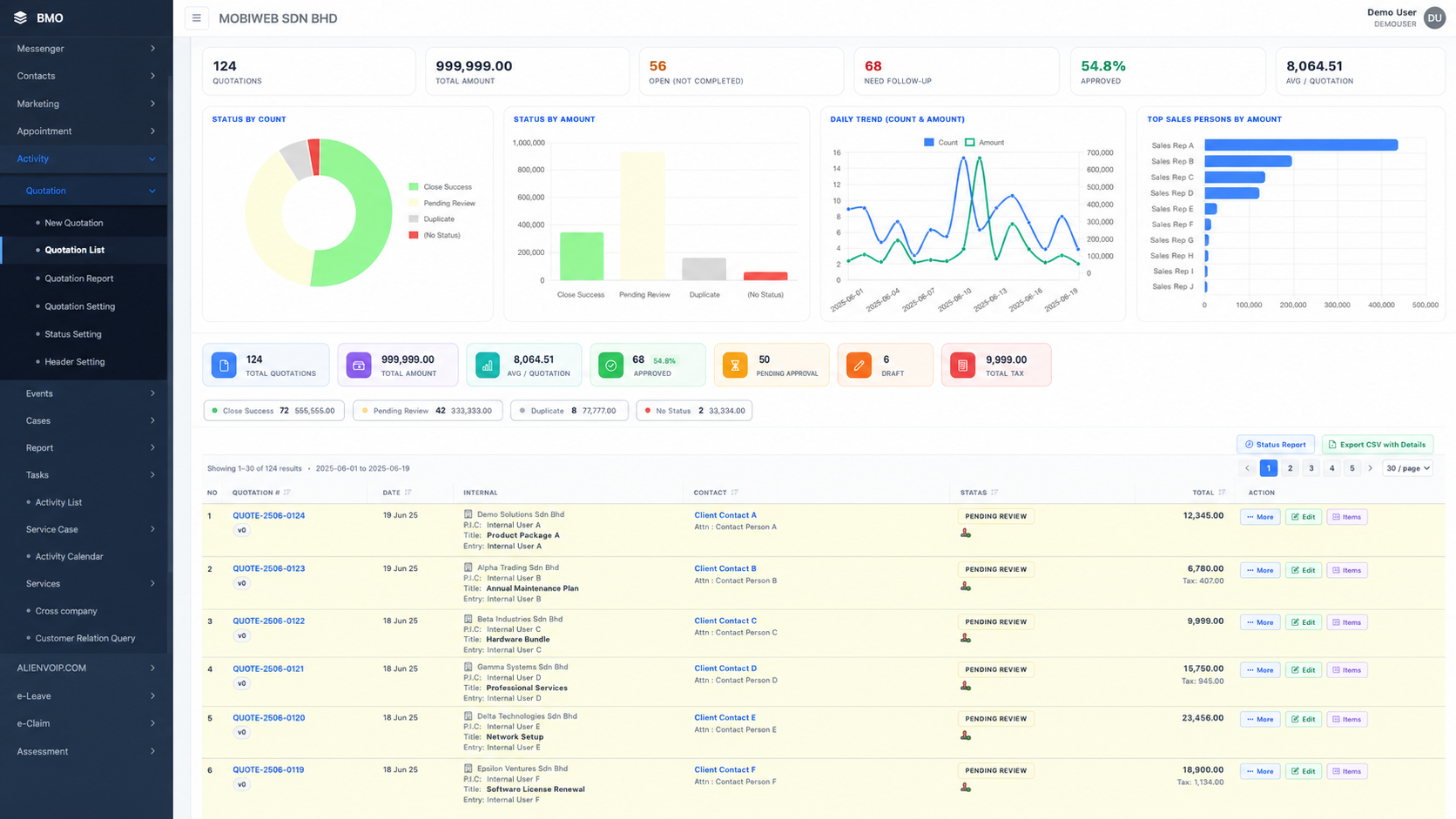
iCRM quotation dashboard — KPI cards, status-by-count and status-by-amount charts, daily trend, top salespersons and the full quotation list
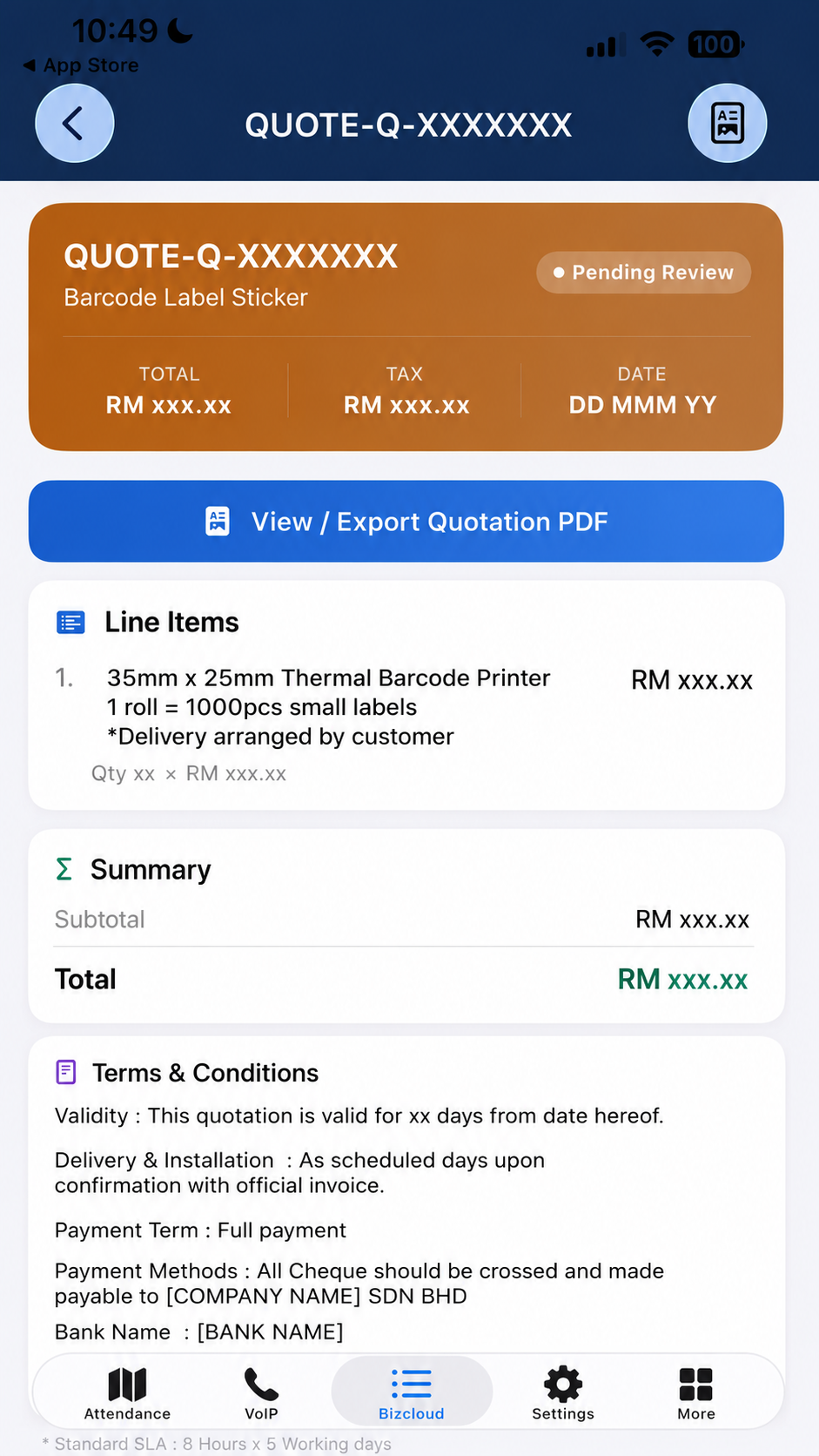
Same quotation viewed in the BizCloud mobile app — status, line items, totals and View / Export PDF

One quotation. Web for your team, app for your client.

Quotation is built into your iCRM. Your sales team creates and manages quotations from the website; your client and on-the-go staff open the same quotation in the BizCloud App, view the PDF, and share it — no extra software, no manual export, no re-typing.

Add-on 1

Web ↔ App quotations

Create a quotation on the website, then view it either on the website or inside the BizCloud App. From the app, your client or team can open and export the quotation PDF and forward it on — straight from their phone.

Create on web View on web View in app Share to client
Add-on 2

Send to App — to many people at once

Use the Send to App button on any quotation. The PDF is generated and uploaded one time, then pushed to every recipient you select — your client, finance, site supervisor — all notified on their phone together.

One click PDF made once Multiple recipients Pushed to phones

Two flows, one quotation

From a quotation built on the web to a PDF in your client's hand — here is exactly how each add-on moves the document.

1 Create quotation → View on web or app → View PDF → Share to client or team
Step 1
Create quotation
Build it on the web — line items, pricing, tax & terms.
Step 2
View on web or app
Open the saved quotation on the website or in the BizCloud App.
Step 3
View the PDF
Open the quotation as a branded, tax-ready PDF.
Step 4
Click Share
Tap the share button on the PDF.
Step 5
Share to client or team
Send the PDF to your customer or your colleagues.
2 View quotation on web → Click Send to App → Sent to BizCloud App (multiple users)
Step 1
View quotation on web
Open the quotation on the iCRM website.
Step 2
Click "Send to App"
Hit the green Send to App button.
Step 3
Pick recipients
Select one or many — search, "select all" or "only with device".
Step 4
Sent to BizCloud App
One PDF is generated & pushed to every recipient at once.
One PDF, uploaded once    delivered to every recipient
AR
A. Rahman
BD
B. Das
CT
C. Tan
EW
E. Wong
FY
F. Yusof
+ more

Each recipient gets a “Quotation Ready” push in the BizCloud App with the PDF attached — they tap to view it and can forward it to the client.

Create on the web. View it anywhere.

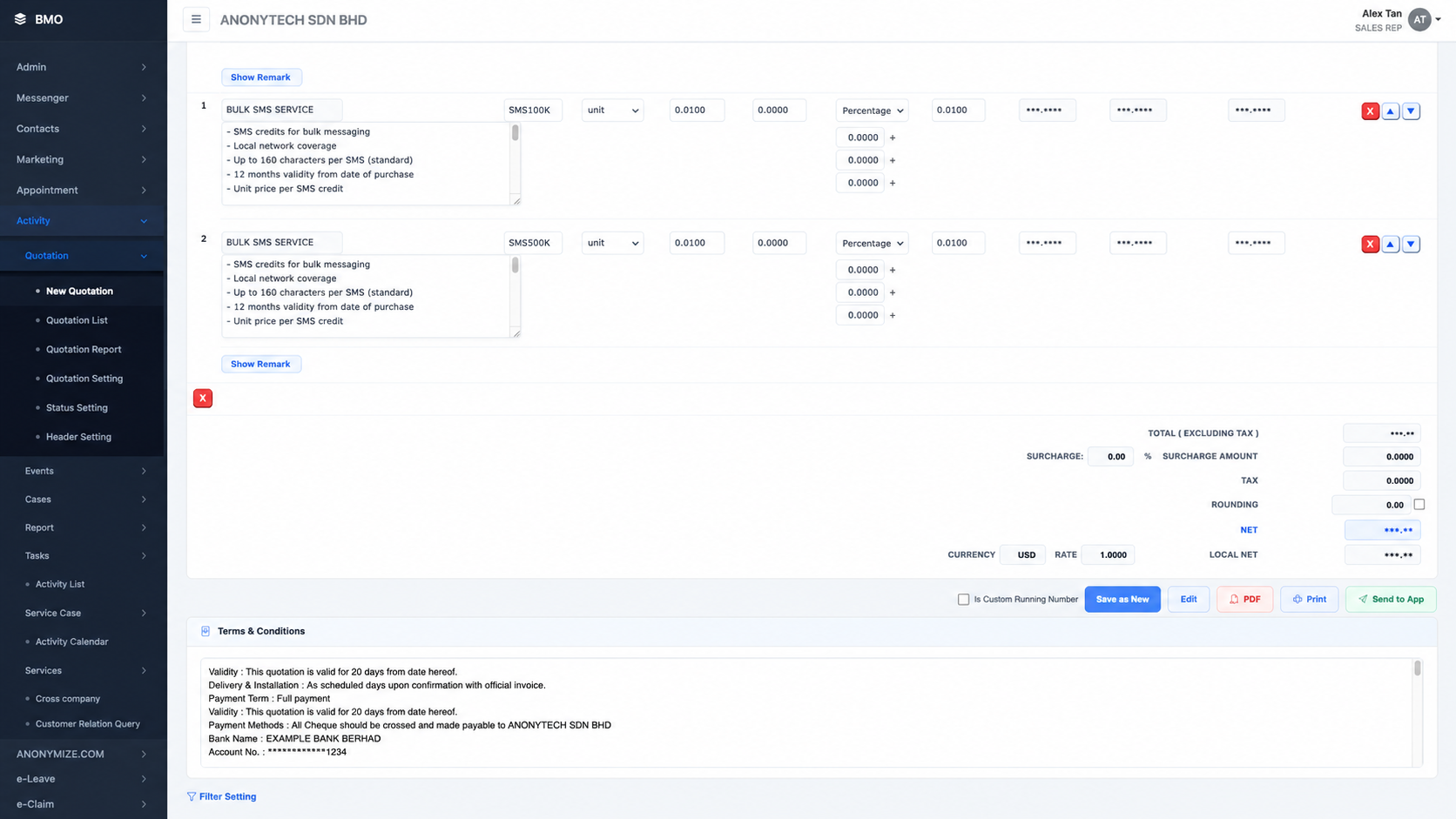
A full quotation builder on the website — line items, unit price, discount, tax, surcharge, rounding, currency, and your standard terms & conditions. Save it, and it is instantly available on the web and in the BizCloud App.

iCRM quotation builder — multiple line items, unit price, percentage discount, surcharge, tax, rounding, currency rate, net total and terms & conditions

Build it once, properly

Unlimited line itemsAdd products with code, description, quantity, unit price and per-line remarks.
Discounts, tax & surchargePercentage or fixed discount, surcharge, tax and rounding — net and local net calculated for you.
Built-in terms & conditionsValidity, payment terms, bank details and support clauses ready on every quotation.
One-click actionsPDF, Print, Save as New, Edit and Send to App — all from the same screen.
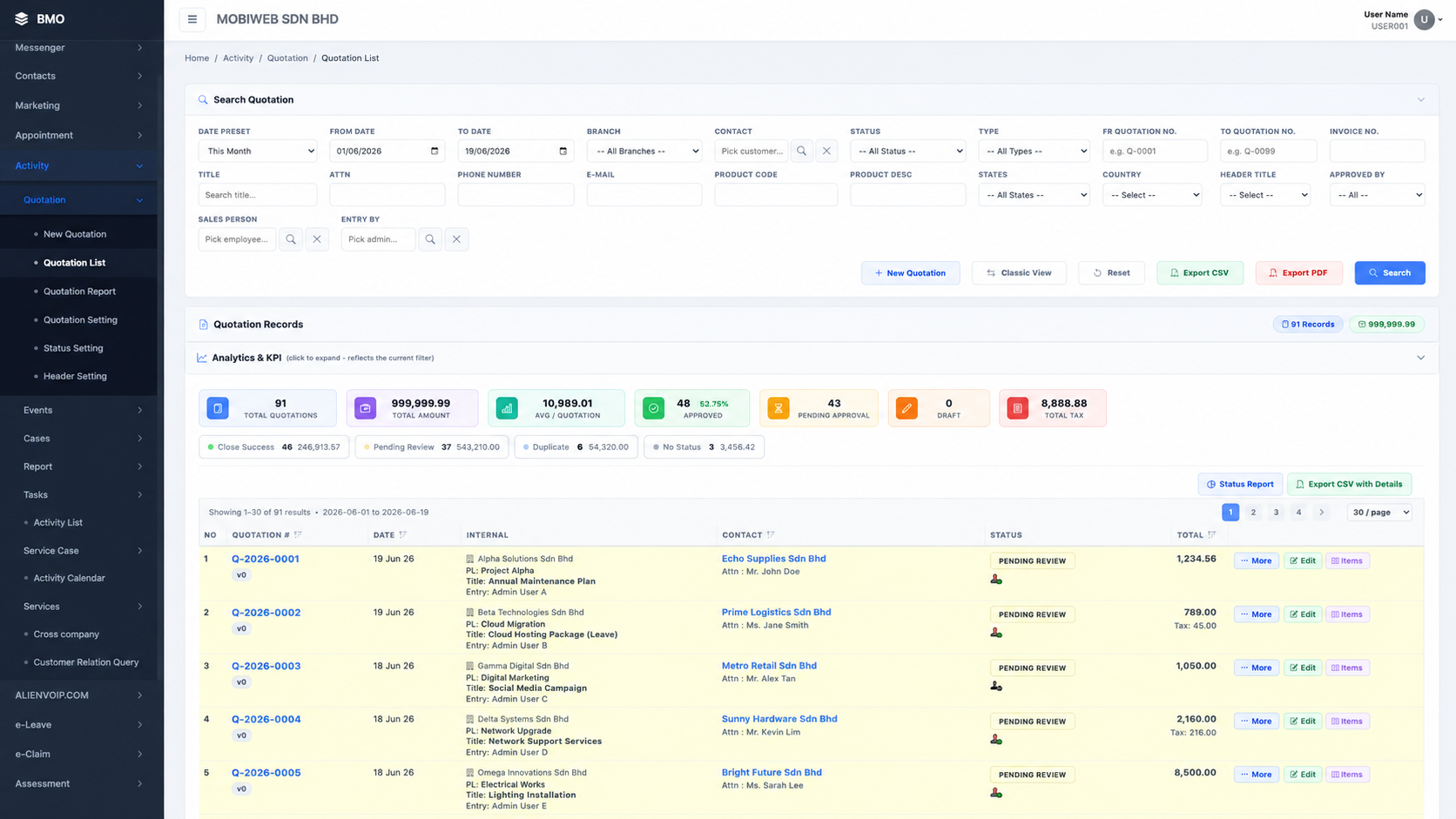
Quotation list on the web — search, filters, status, totals and per-row More / Edit / Items actions

On the web — search, filter and manage every quotation

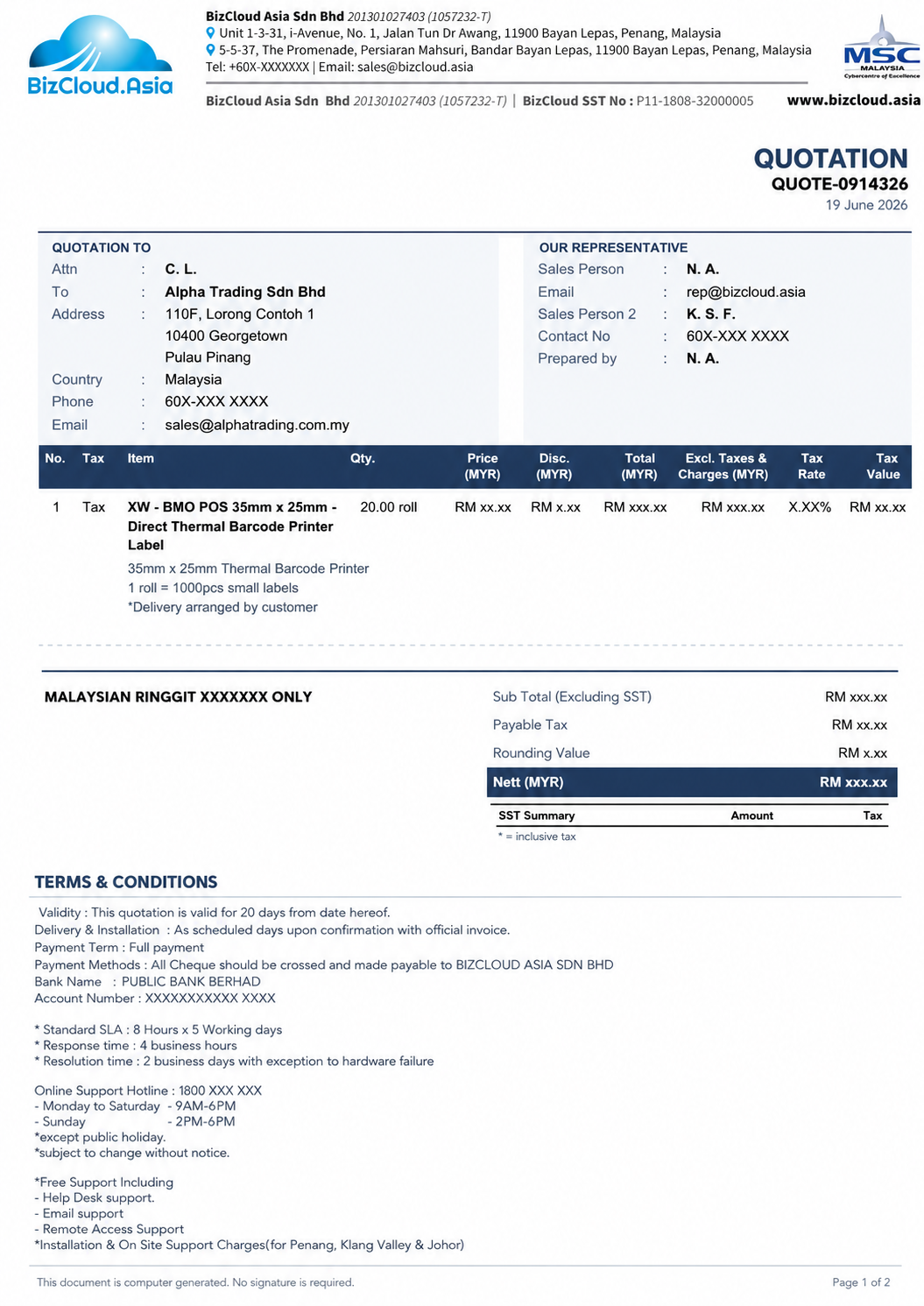
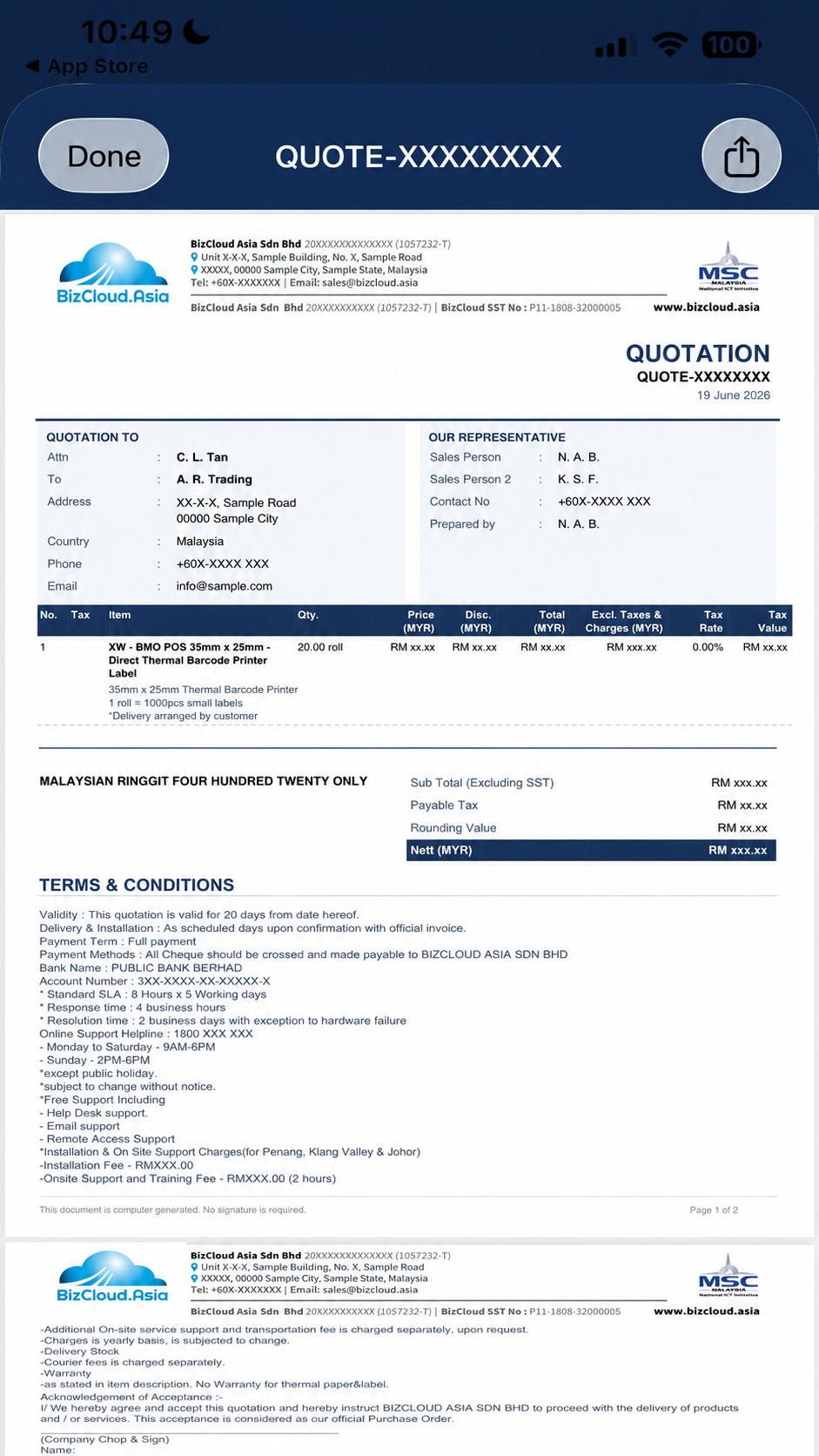
Quotation PDF — company header, quotation-to and representative blocks, itemised table, totals and terms & conditions

The generated quotation PDF — branded and tax-ready

Same quotation, in the BizCloud App
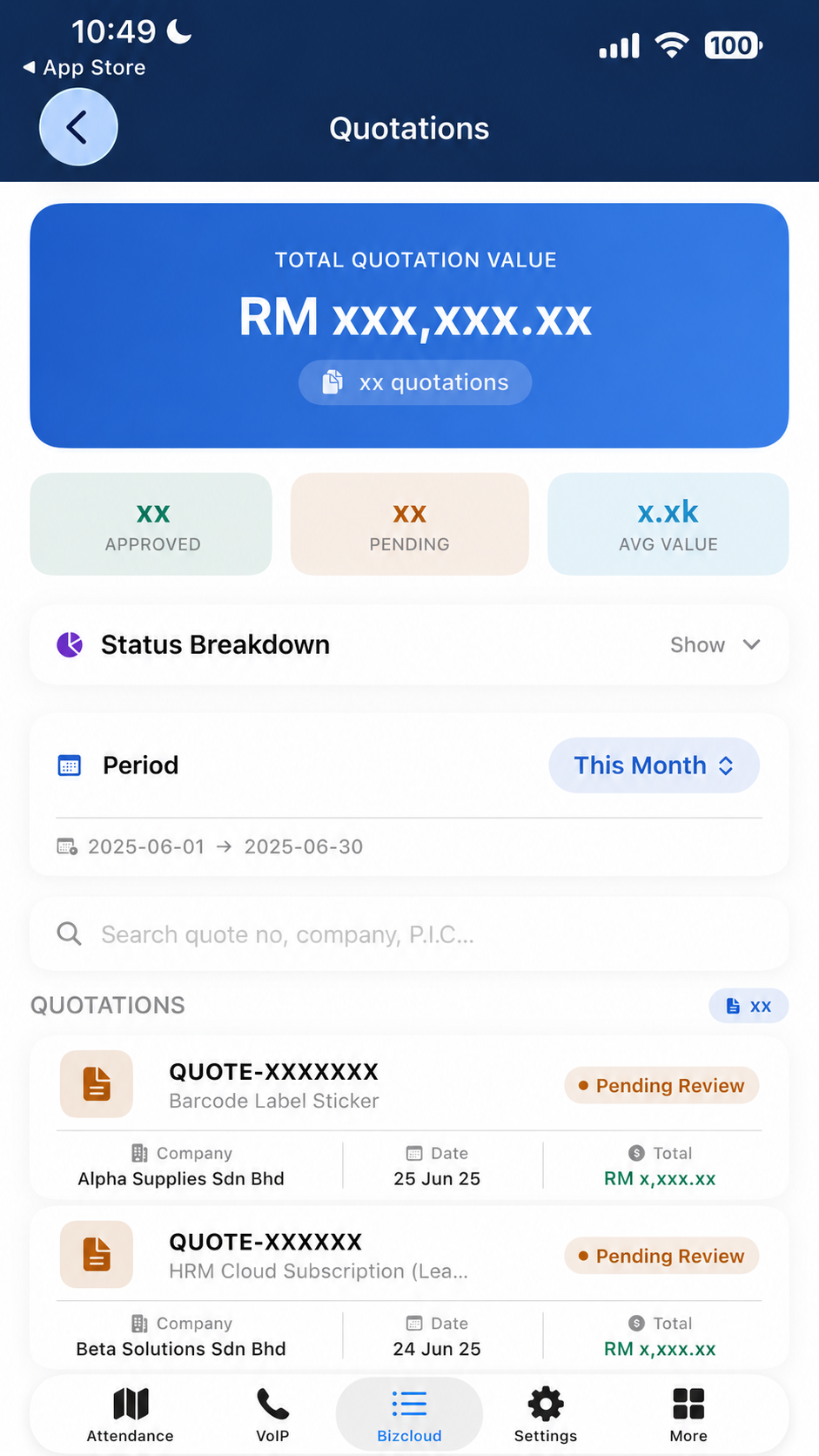
BizCloud App quotation list — total value, approved / pending counts, status breakdown and per-company quotations

Quotation list & totals on the phone

BizCloud App quotation detail — status, line items, subtotal, total and terms & conditions

Full detail, line items & totals

BizCloud App showing the quotation PDF with a share button for sending to the client

Open the PDF & share to client

Send to App — one PDF, many phones.

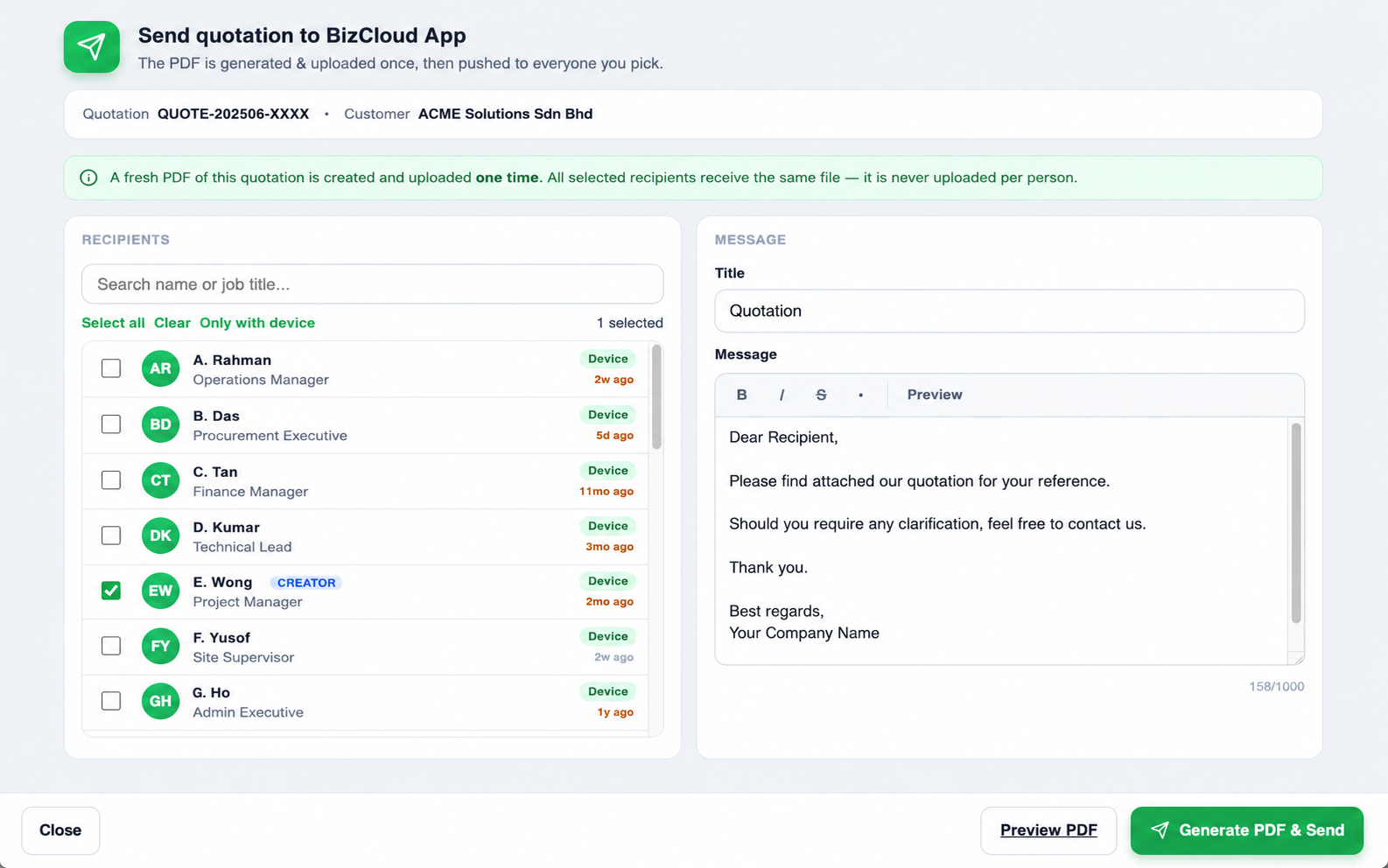
Hit Send to App on any quotation and choose who should receive it. iCRM builds the PDF once, uploads it once, and pushes the very same file to everyone you pick — never re-uploaded per person.

Send quotation to BizCloud App dialog — recipient list with select all / clear / only-with-device, multi-select checkboxes, message editor and Generate PDF & Send

Pick recipients, write a note, send

Multiple recipientsTick as many people as you need — or use Select all / Only with device to filter fast.
PDF generated onceA fresh PDF is created and uploaded a single time. Everyone receives the identical file.
Custom messageAdd a title and message (bold, italic, preview) so recipients know what they are getting.
Instant pushSelected users are notified in the BizCloud App and can open the PDF immediately.
The PDF is uploaded one time. All selected recipients receive the same file — it is never uploaded per person.
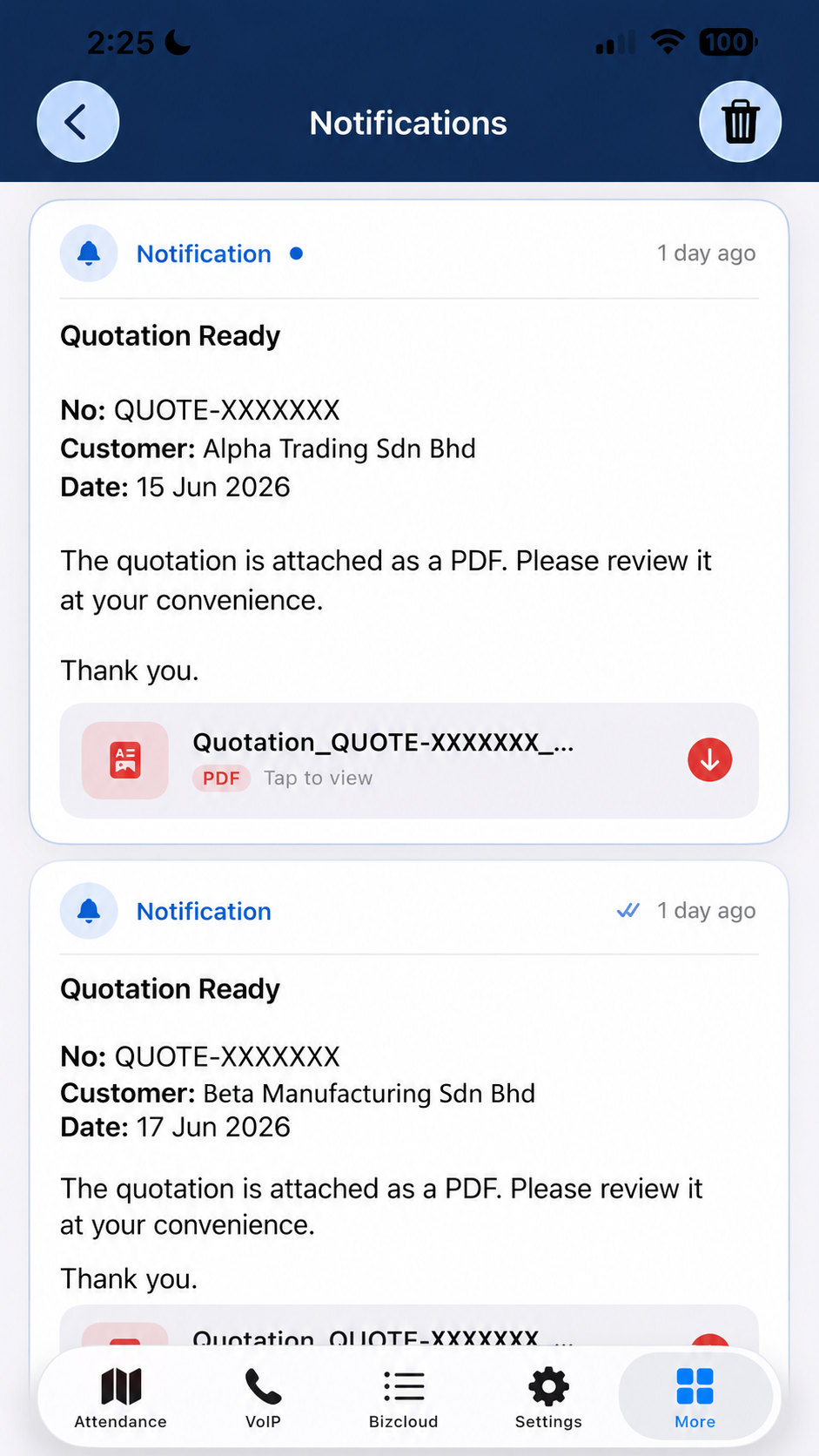
BizCloud App Notifications — a 'Quotation Ready' alert showing quote number, customer, date, a short message and the quotation PDF with tap-to-view and download

What each recipient sees on their phone

On the recipient's phone

A “Quotation Ready” alert — PDF attached

The moment you send from the web, every recipient gets a push notification in the BizCloud App — with the quotation details and the PDF ready to open, no email needed.

Instant pushA "Quotation Ready" notification arrives the moment you hit send.
Key details up frontQuote number, customer and date are shown right in the message.
PDF attachedThe quotation PDF is attached — tap to view or download it.
Read statusSee when a recipient has opened the notification.

See every quotation's status at a glance

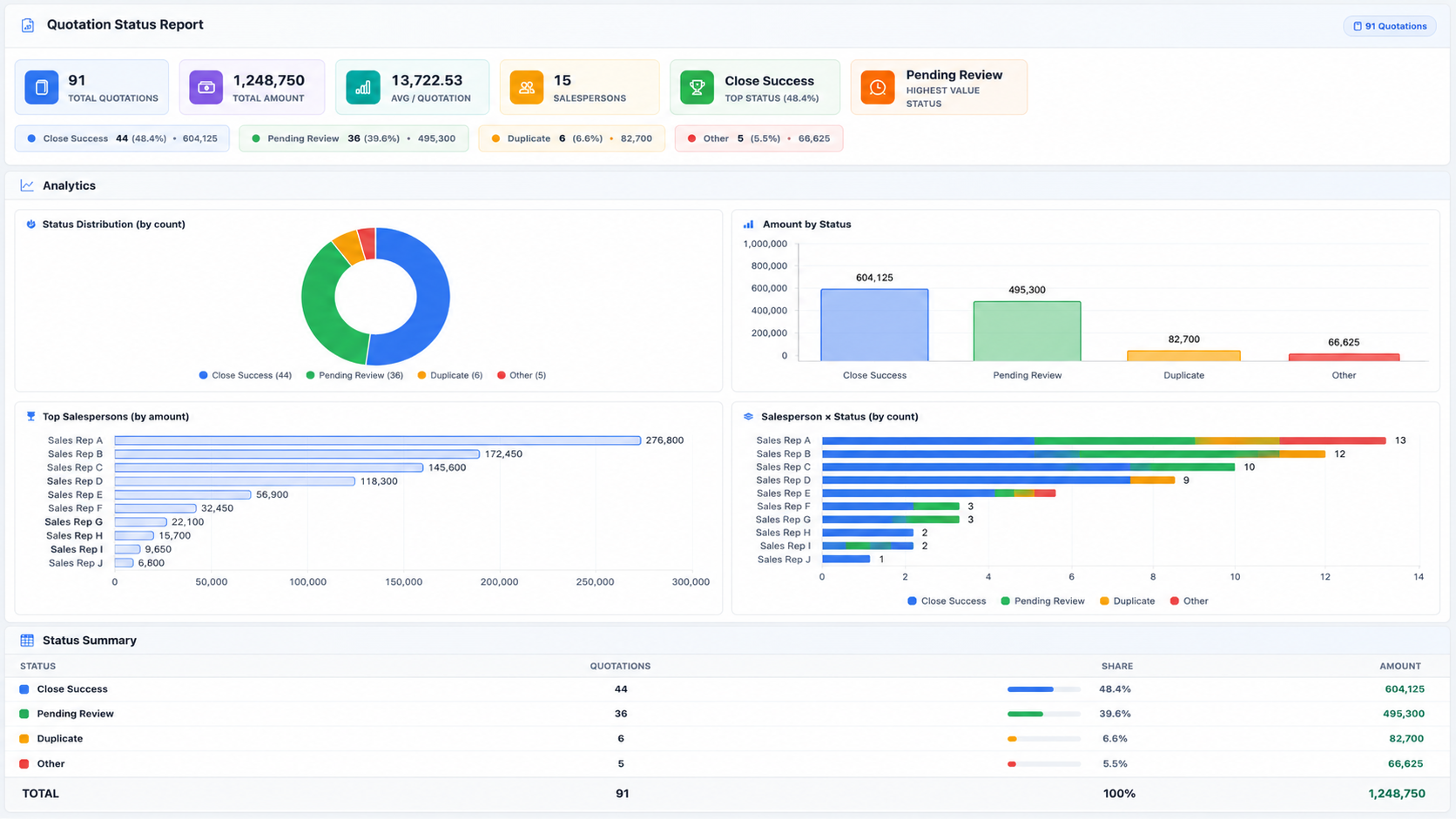
Beyond creating and sending, the quotation list and Status Report turn your pipeline into numbers — total value, approval rate, status split and salesperson performance — all reflecting your current filters.

Quotation Status Report — total quotations, total amount, average per quotation, status distribution donut, amount by status and top salespersons

Quotation Status Report — KPIs, status split & salesperson breakdown

Quotation list with Analytics & KPI dashboard — status by count, status by amount, daily trend and top sales persons

Built-in Analytics & KPI on the quotation list

Total & average value

Total quotation value and average per quotation, live for the period you select.

Approval & status split

Close success, pending review, duplicate and more — by count and by amount.

Top salespersons

See who is generating the most quotation value and how each status splits per rep.

Export & share

Export to CSV or PDF, or open the full Status Report for management review.

Quotations where your customers already are

Quoting the old way
Quotation typed in Word or Excel, emailed and forgotten.
Client says "can you resend?" — you dig through your sent folder.
No idea which quotations are approved, pending or lost.
Each teammate keeps their own copy. Nothing is shared.
Quoting with iCRM
Create on the web; the same quotation is live in the BizCloud App.
Send to App pushes the PDF to your client and team in one tap.
Status Report shows approved, pending and value in real time.
One source of truth — tied to the same contacts and team you manage in iCRM.

Create a quotation. Land it on your client's phone.

See the Quotation add-on live — build one on the web and watch it appear in the BizCloud App, ready to send to anyone you choose.

Request a demo → Ask us now About the BizCloud App →