WhatsApp AI Chatbot Cloud PBX

Stop switching
between reports.
See everything in one screen.

iCRM Omnichannel Analytics brings your WhatsApp messages, AI chatbot conversations, and VoIP phone calls into a single unified dashboard — so you can make faster decisions with the full picture.

See it in action → Start free trial
iCRM Omnichannel Analytics — Unified Command Center showing WhatsApp, AI, and VoIP metrics in one dashboard

Your customer data is scattered across 3 channels

WhatsApp Business

Messages come in, AI replies, agents reply — but who's tracking response times? How many customers gave up waiting?

VoIP Phone System

Calls are ringing — some answered, some missed. Which agent is overwhelmed? Which hours need more staff on the phones?

AI Chatbot

Your bot handles hundreds of conversations. How many actually needed a human? How much cost is it saving you?

Without a unified view, you're flying blind — WhatsApp numbers in one report, call stats in another, AI data somewhere else. Never the complete picture.

One platform. Three channels. Four powerful reports.

Unified Command Center
① Report  ·  Boss view

Unified Command Center

The health score for your entire operation

Health score 0–100, 8 KPI cards with period-over-period arrows, channel mix doughnut, daily combined trend chart, and AI cost savings — all in one executive dashboard.

One 0–100 health score for your entire operation
Agent 360° Scorecard
② Report  ·  Staff accountability

Agent 360° Scorecard

Combined WhatsApp + VoIP per agent

Unified leaderboard ranking agents by WhatsApp replies + VoIP calls. Click any agent to drill into daily patterns, channel split, answer rate, talk time, and customer count.

Compare agents across WhatsApp and calls in one table
Customer Journey Timeline
③ Report  ·  Customer insight

Customer Journey Timeline

Every touchpoint for any customer

Search by phone number and see a merged chronological timeline of WhatsApp messages, AI replies, escalations, and phone calls. Understand exactly how each customer was served.

Track a customer from first WhatsApp message to call resolution
SLA & Capacity Planning
④ Report  ·  Staffing & SLA

SLA & Capacity Planning

Never miss an SLA target again

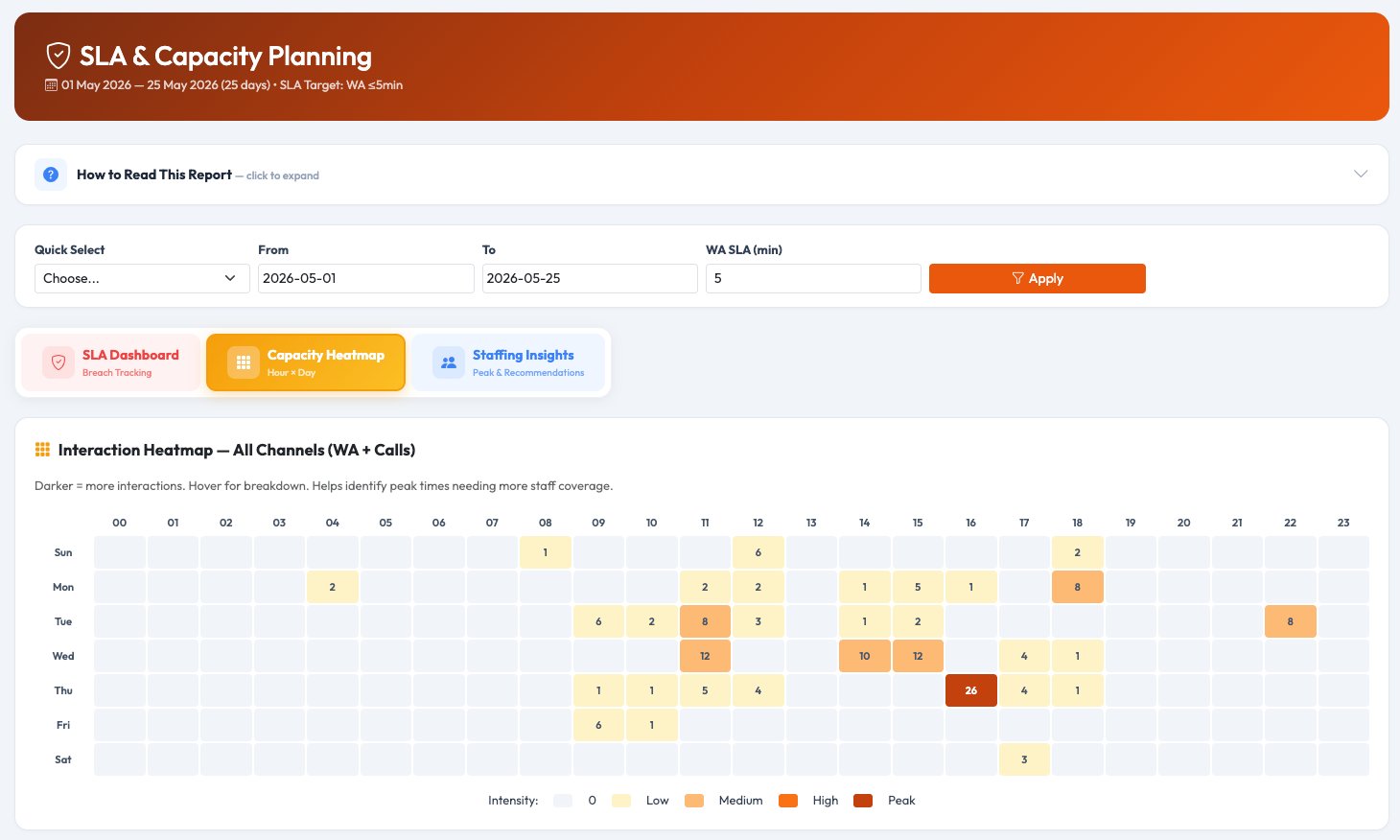
Track WhatsApp response SLA and call answer rates with visual gauges. 7×24 capacity heatmap identifies peak hours. Automated staffing recommendations — red for high demand, green for low.

Automated staffing recommendations based on real data
Unified Command Center

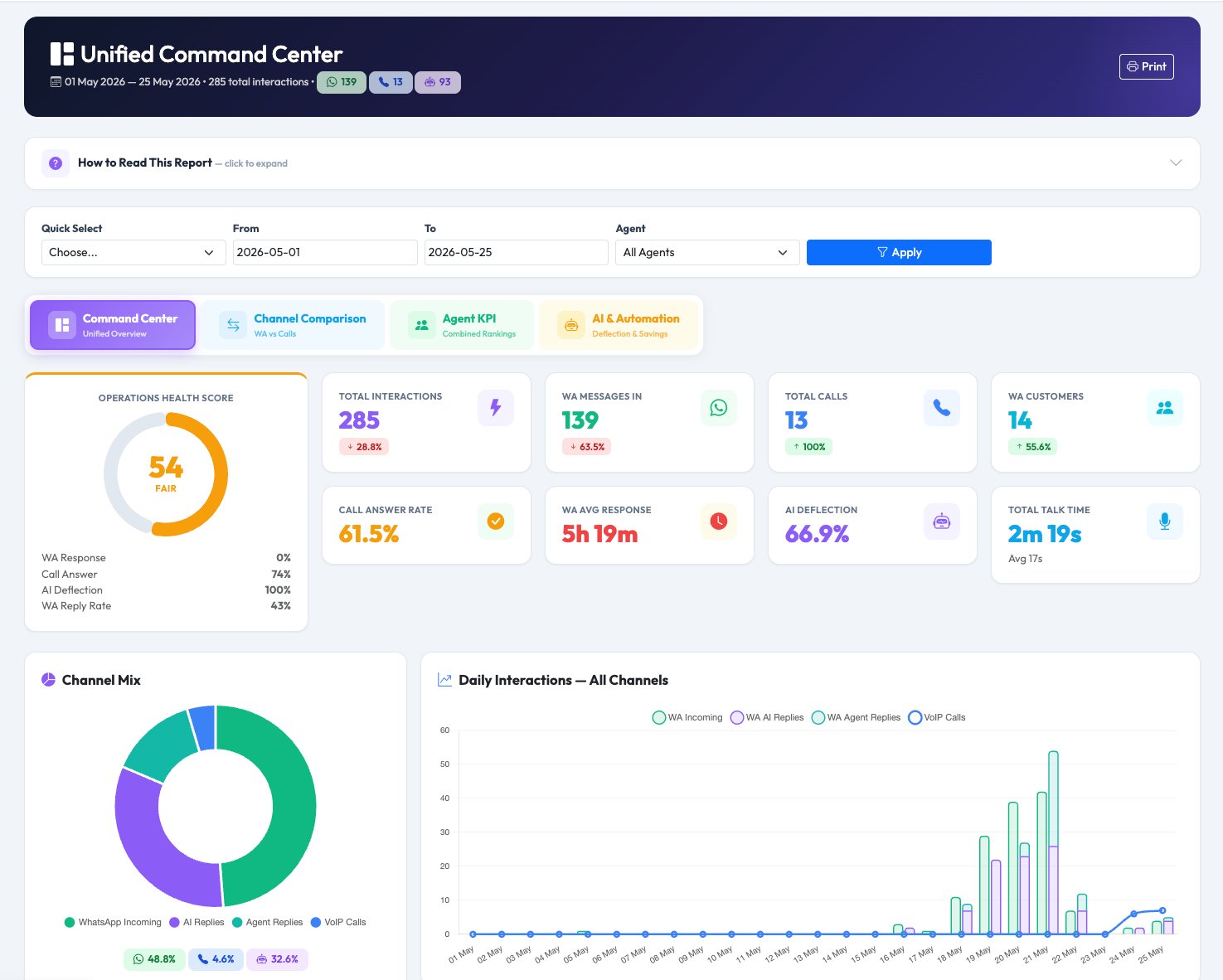
Your entire customer service operation in one health score. Open this once a day and know immediately if everything is running well — or needs attention. Four tabs: Command Center, Channel Comparison, Agent KPI, and AI & Automation.

iCRM Unified Command Center — Operations Health Score, KPI cards, channel mix doughnut, daily interactions chart

Command Center tab — Health Score 54 (Fair), 285 total interactions, KPI cards with trend arrows, channel mix & daily chart

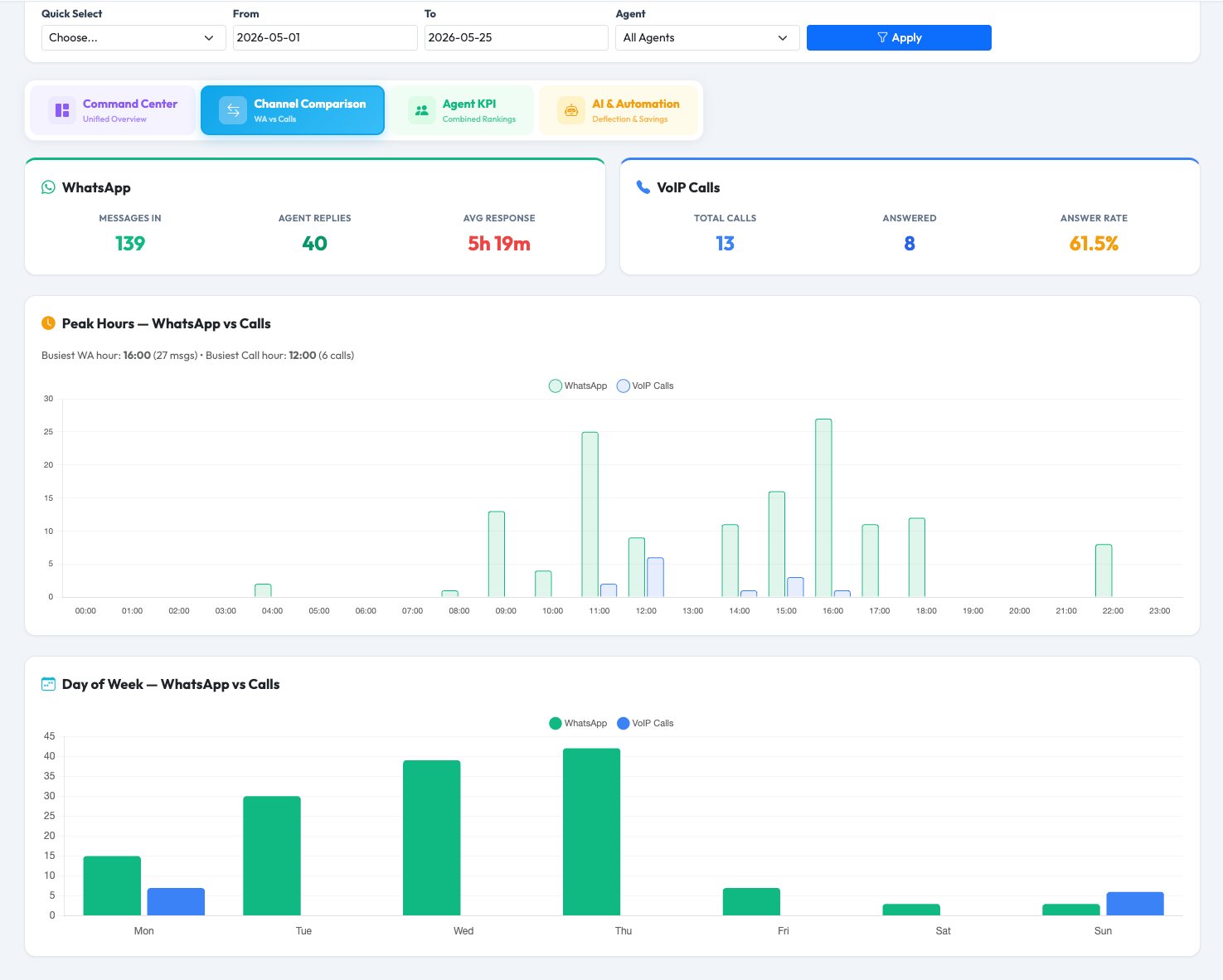
Channel Comparison — WhatsApp vs VoIP side-by-side metrics, peak hours chart, day of week comparison

Channel Comparison tab — WhatsApp vs VoIP metrics side by side, peak hours & day-of-week charts

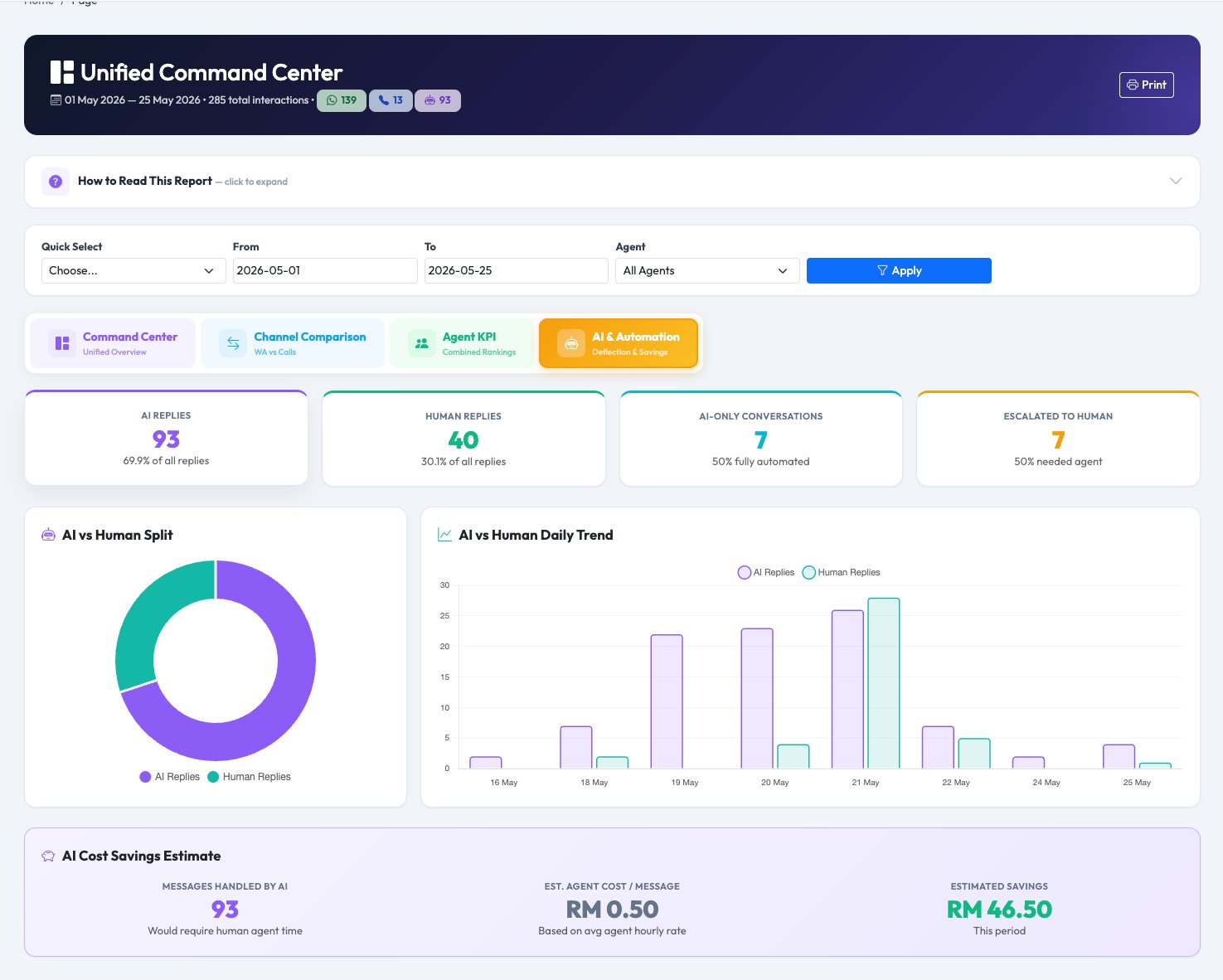
AI & Automation — AI vs Human split, AI-only conversations, escalations, cost savings estimate

AI & Automation tab — AI vs Human split, AI-only conversations, escalations, RM savings estimate

Health Score 0–100

Composite: WA response rate, call answer rate, AI deflection, customer growth — colour-coded Excellent/Good/Fair/Needs Attention.

8 KPI cards

Total interactions, WA messages, calls, customers, answer rate, avg response, AI deflection, talk time — all with period-over-period arrows.

Channel comparison

WhatsApp vs VoIP metrics side by side. Peak hours chart shows when each channel is busiest. Day-of-week patterns.

AI cost savings

Automatically calculates estimated ringgit savings from AI handling conversations that would otherwise need a human agent.

Agent 360° Scorecard

See every agent's full performance across WhatsApp and phone in one combined leaderboard. Click any agent name to drill into their daily patterns, channel split, and response metrics.

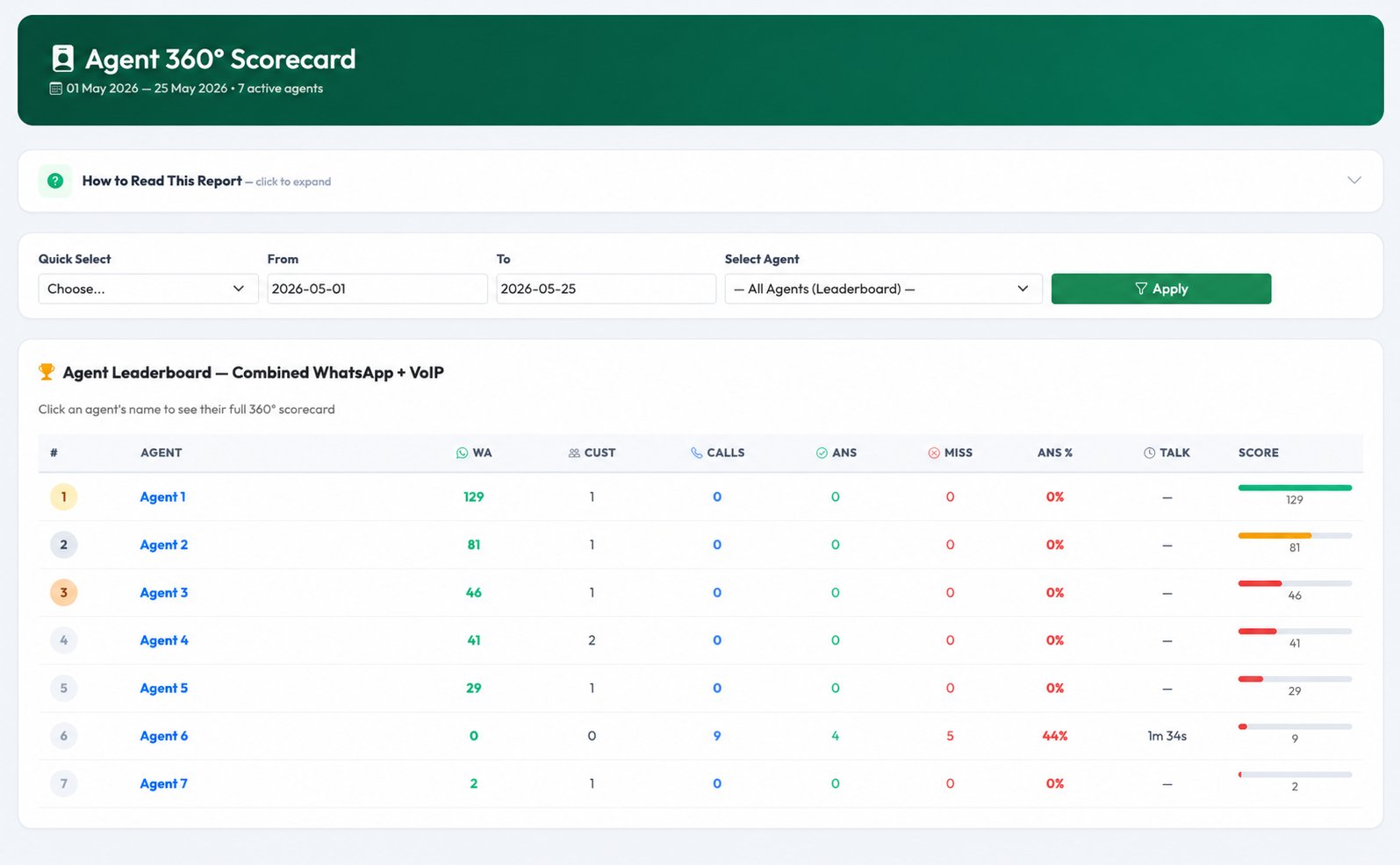
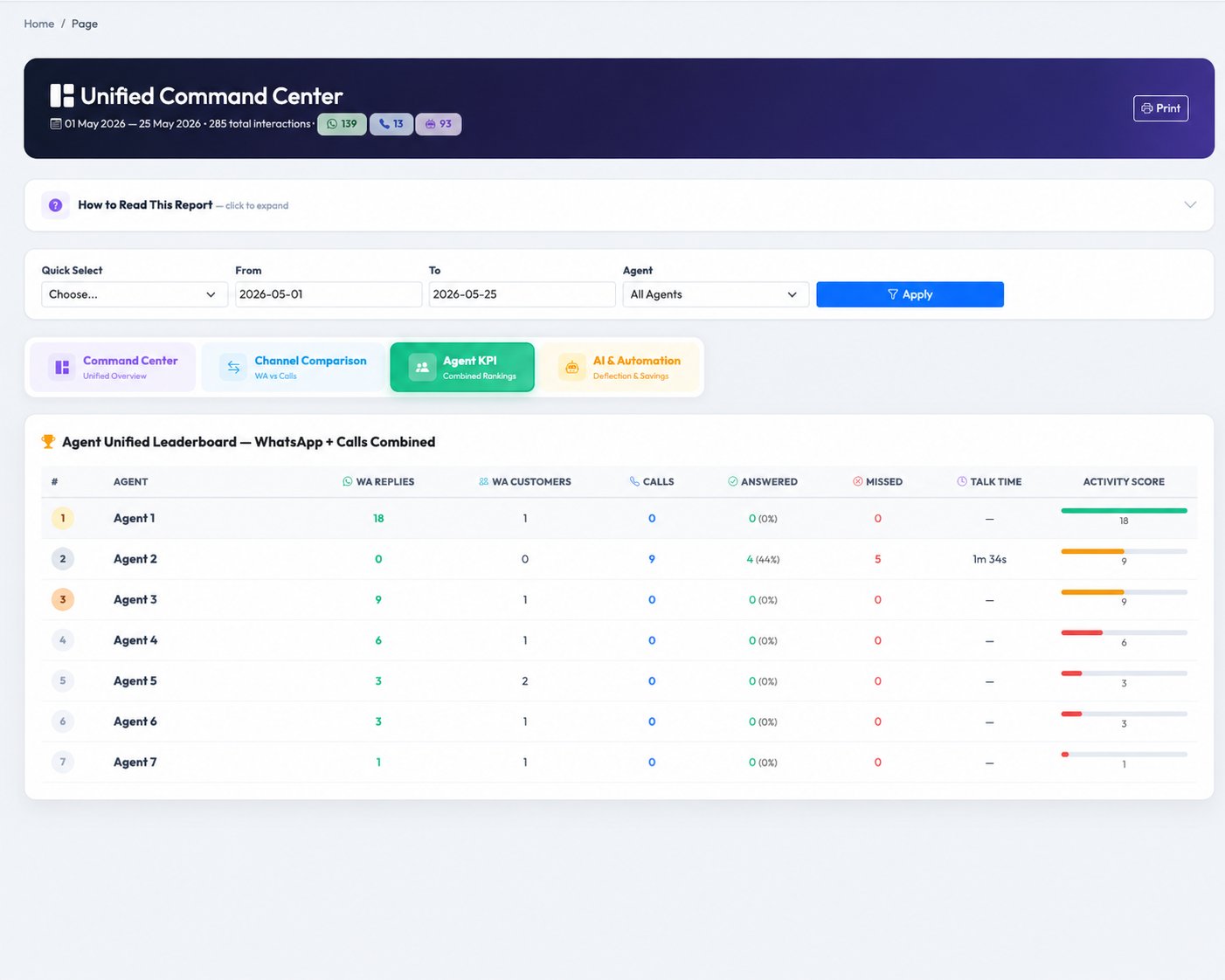
Agent 360° Scorecard Leaderboard — 7 agents ranked by combined WhatsApp + VoIP activity

Leaderboard — agents ranked by WA replies + VoIP calls combined, with activity score bar

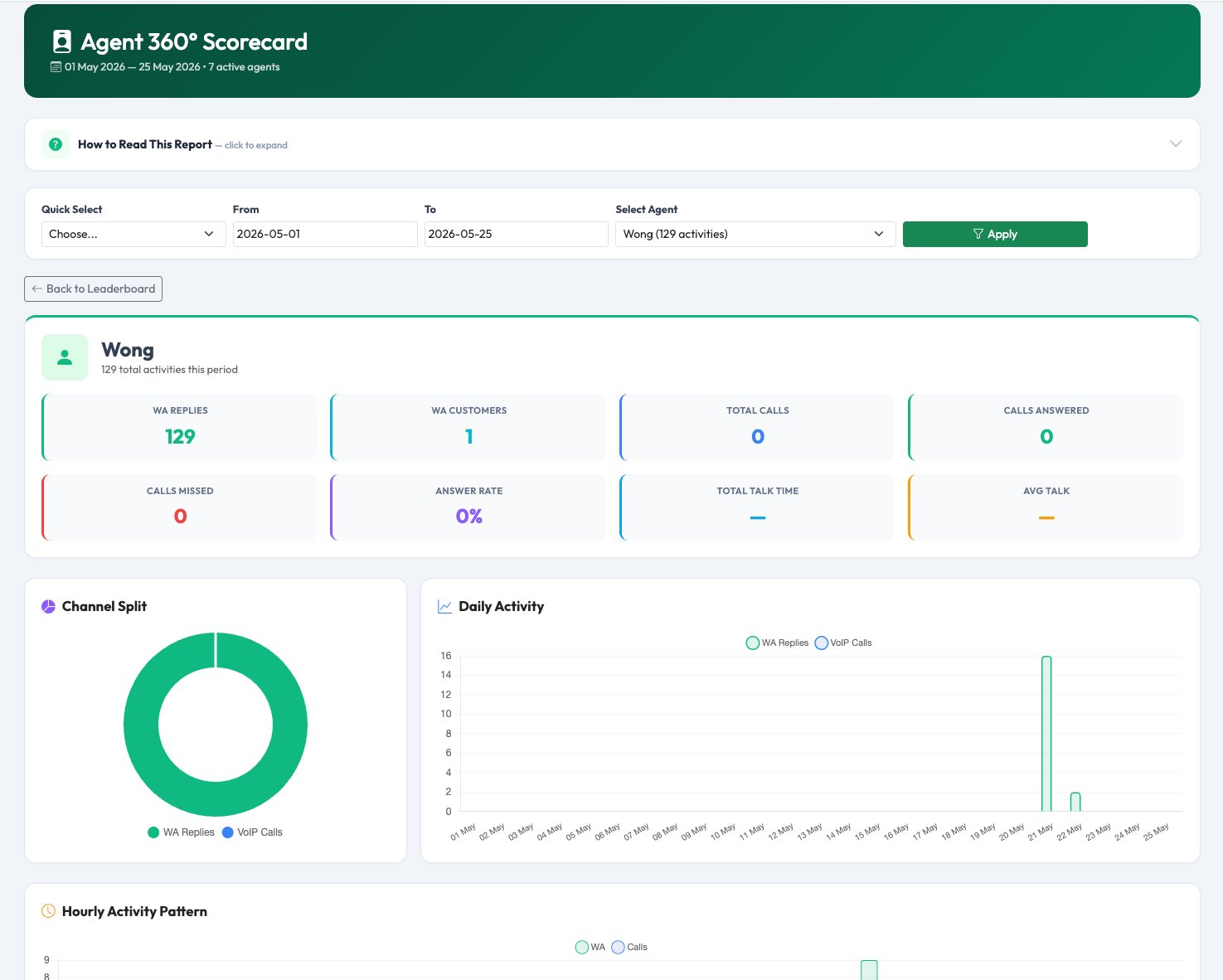
Agent detail — WA replies, customers, calls, answer rate, channel split doughnut, daily activity chart

Agent detail view — 8 KPI cards, channel split doughnut, daily activity & hourly pattern charts

Unified Agent KPI — combined leaderboard inside Command Center showing WA, calls, answered, missed, talk time

Unified Agent KPI (inside Command Center) — all agents with WA replies, customers, calls, answered, missed, answer %, talk time

Combined leaderboard

Agents ranked by total activity: WA replies + VoIP calls. Visual score bar shows each agent relative to the top performer.

Channel split

Doughnut showing proportion of WhatsApp vs VoIP activity per agent. Reveal channel bias or coverage gaps.

Hourly activity pattern

When is this agent most active? Useful for shift planning and checking if working hours match the contract.

Customer Journey Timeline

Search any phone number — see every touchpoint that customer had with your business: WhatsApp messages, AI replies, agent responses, escalations, and phone calls — all merged into one chronological view.

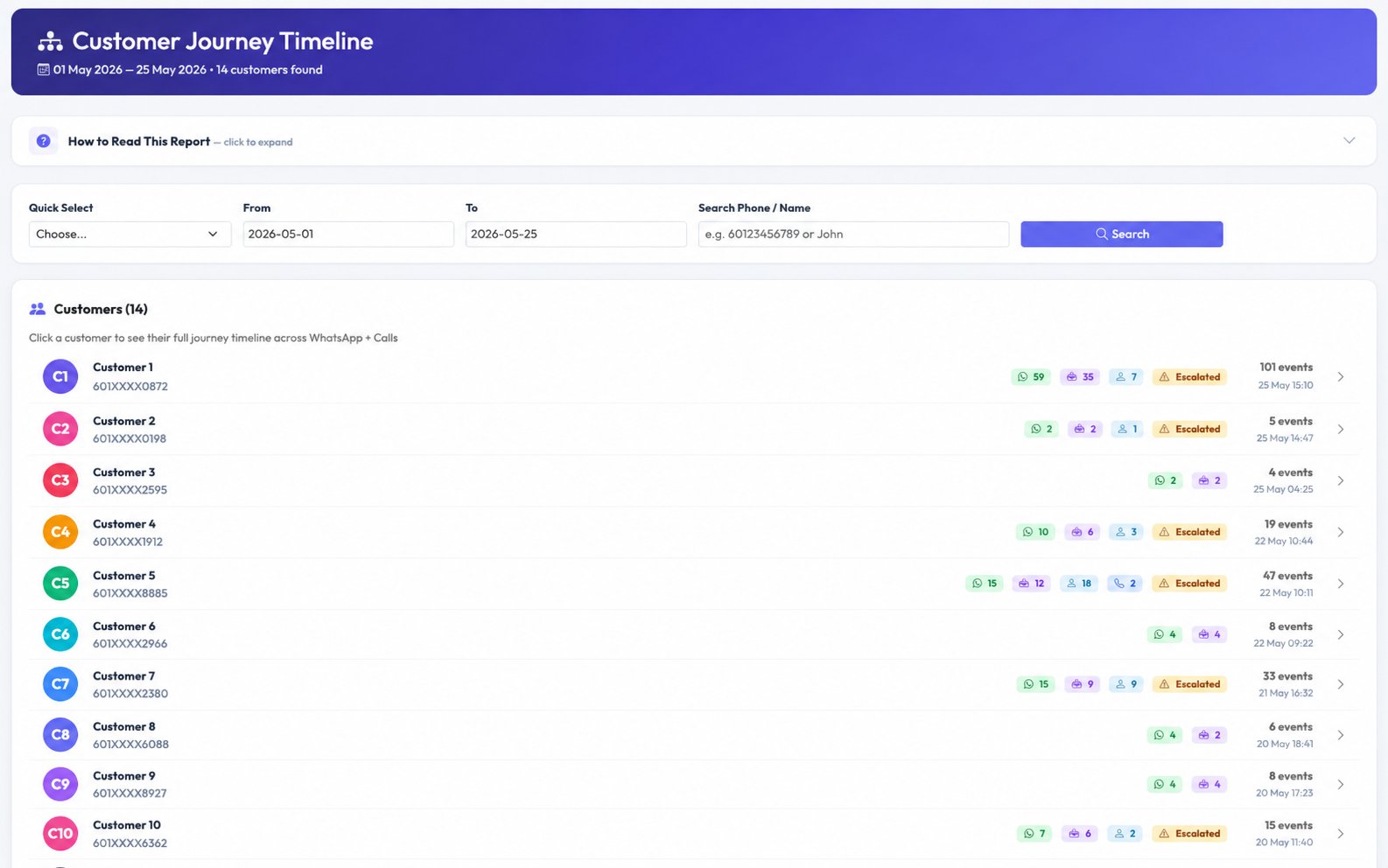
Customer Journey list — 14 customers with WhatsApp, AI, agent, call, and escalation badges

Customer list — all customers with colour-coded event badges (WA, AI, agent, calls, escalations)

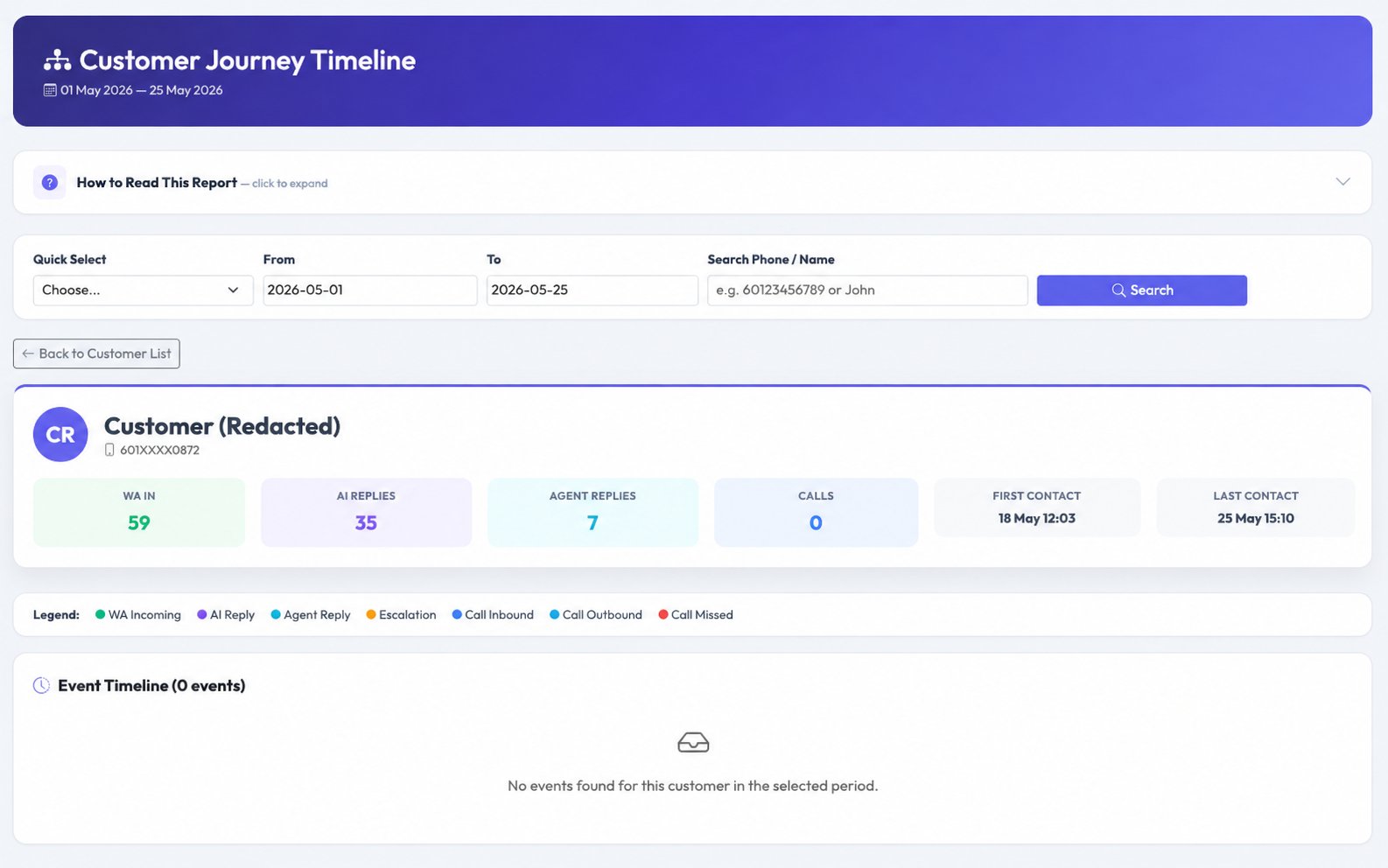
Customer Journey detail — individual customer profile with WA IN 59, AI replies 35, agent 7, calls 0 stats

Customer detail — stats summary + full event timeline with legend

Timeline event types
WA Incoming — customer sent a WhatsApp message
AI Reply — chatbot auto-replied
Agent Reply — human responded on WhatsApp
Escalation — customer requested a human agent
Call Inbound / Outbound — answered
Call Missed / Failed — no answer

Customers are matched across channels by comparing the last 8 digits of their WhatsApp number with call-from/call-to numbers in the PBX records.

SLA & Capacity Planning

Track WhatsApp response SLA and call answer rates with visual semi-circle gauges. Identify peak hours with a 7×24 capacity heatmap. Get automated staffing recommendations — red for high demand, green for low-activity hours.

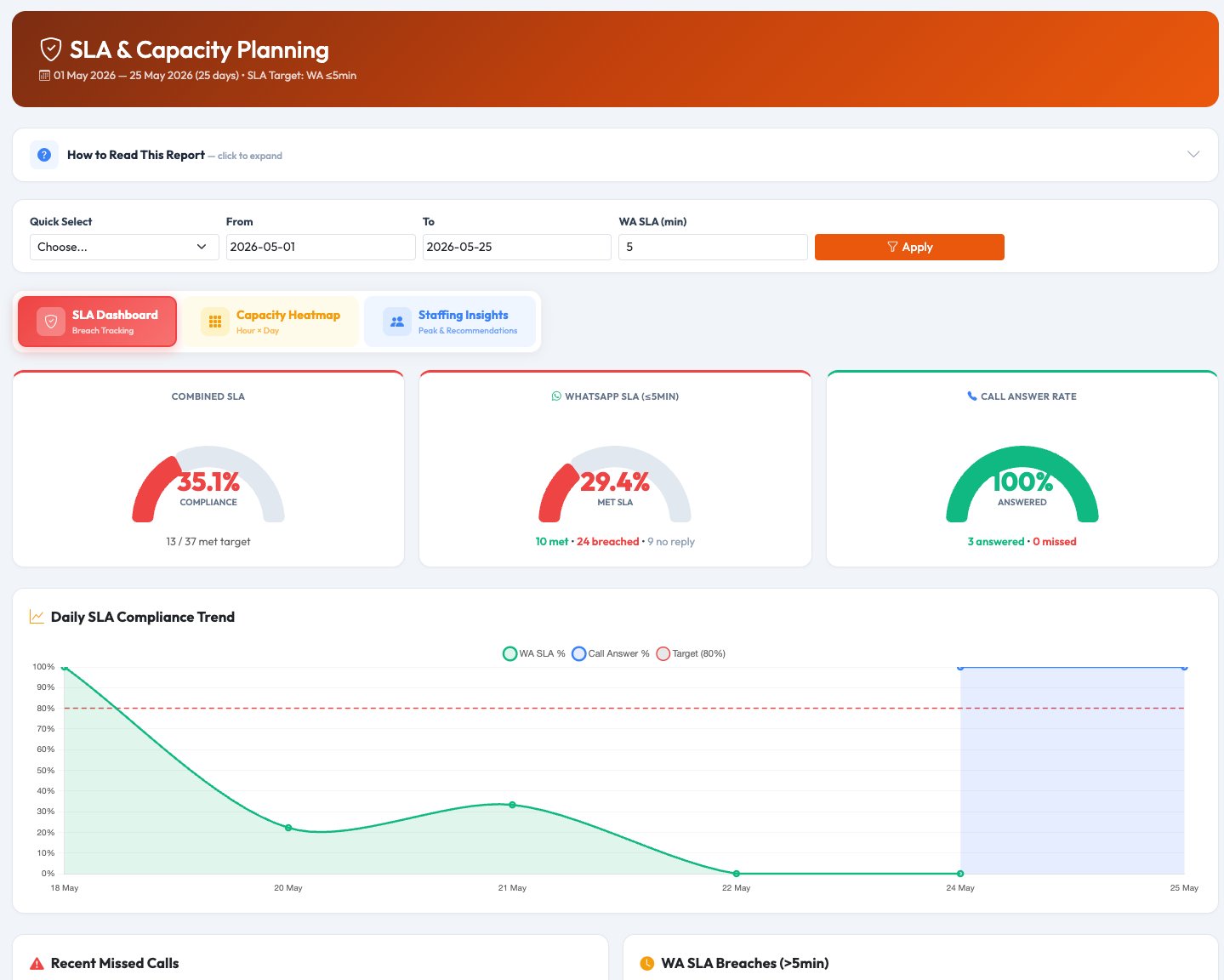
SLA Dashboard — combined SLA gauge 35.1%, WhatsApp SLA 29.4%, Call Answer Rate 100%, daily compliance trend

SLA Dashboard tab — three gauges + daily SLA compliance trend + missed calls & WA breach lists

Capacity Heatmap — 7-day × 24-hour interaction grid, colour-coded from low yellow to dark orange peak

Capacity Heatmap tab — 7×24 grid, yellow to dark orange intensity, hover for WA vs call breakdown

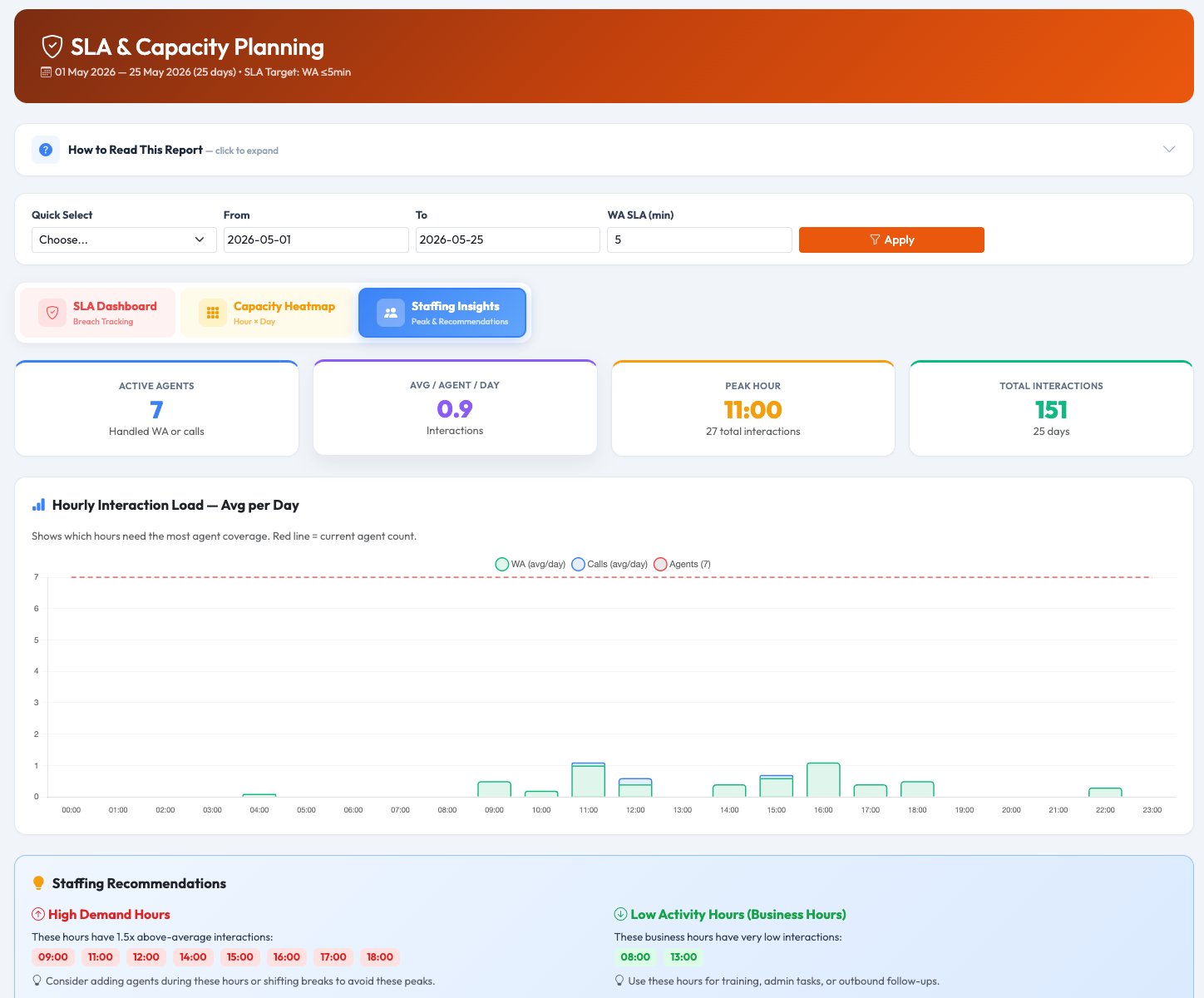
Staffing Insights — hourly load chart with agent reference line, high demand and low activity hour recommendations

Staffing Insights tab — hourly load chart + automated high demand (red) & low activity (green) hour badges

SLA gauges

Three semi-circle gauges: Combined SLA %, WhatsApp SLA (configurable — default ≤5 min), and Call Answer Rate. Each with met vs breached count.

Capacity heatmap

7-day × 24-hour interaction grid showing combined WA + call volume. Darker = busier. Hover any cell for channel breakdown.

Staffing recommendations

Automated: red badges for hours with 1.5× above-average interactions, green badges for low-activity business hours — with specific action guidance.

Why businesses switch to unified analytics

Save 2+ hours daily

No more toggling between WhatsApp report, call report, and AI report. One dashboard covers everything.

Complete customer picture

A customer who messaged and called — you see both touchpoints together in one timeline. No more partial stories.

Fair agent evaluation

An agent handling calls all day shouldn't be judged only on WhatsApp metrics — and vice versa. One combined score.

Never miss SLA

Automated alerts before SLA breaches happen. WhatsApp response SLA and call answer rate tracked together.

AI ROI in ringgit

See exactly how much your AI chatbot saves you — calculated in ringgit per period — compared to equivalent human effort.

Smarter staffing

Combined heatmap shows when you need people across all channels — not just WhatsApp or just calls in isolation.

Ready to see your full picture?

One dashboard. Three channels. Complete visibility over your customer service operation.

Start free trial → Ask us now See VoIP-only analytics →